
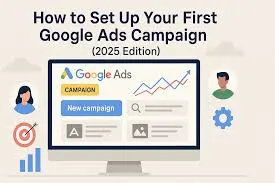
Starting your maiden Google Ads campaign in 2025 is going to be considerably easier if you go about it the right way. First, define your campaign goal, select the best campaign type, and research high-intent keywords. Then set a realistic budget, create compelling ad copy, and design a strong landing page. Optimize performance and drive better conversions effectively by leveraging audience targeting, extensions, and real-time analytics.
Table of Contents
1 . Introduction
2 . Key Problems Beginners Face in Google Ads Setup
2.1 Budget Gets Wasted Fast
2.2 Weak Landing Pages
3 Why Google Ads Still Works in 2025
4 . Understanding Google Ads Basics
5 . Step 1 – Set Clear Campaign Goals
6 . Step 2 – Conduct Keyword Research
7 . Step 3 – Choose the Right Campaign Type
7.1 Search Campaign
7.2 Display Campaign
7.3 Video Campaign
7.4 Performance Max
8 . Step 4 – Set Budget & Bidding Strategy
8.1 Budget
8.2 Bidding Options
9 .Step 5 – Create High-Converting Ad Groups
10 . Step 6 – Write Compelling Ad Copy
11 . Step 7 – Set Up Targeting & Audience Filters
12 . Step 8 – Add Ad Extensions
13 . Step 9 – Optimize Landing Pages
14 .Step 10 – Track Performance
15 .Smart Strategies No One Else Is Using
15.1 First-Party Data Mapping
15.2 Micro-Intent Keyword Clustering
16. Conclusion
1 . Introduction
Setting up your first Google Ads campaign in 2025 might seem daunting because, yes, the platform is more AI-driven, competitive, and complicated than ever. Constant updates, new automation features, and advanced targeting options drive a newbie to a lot of confusion in deciding where to begin. This step-by-step guide will summarize the whole process in easy bites and take you through every important stage, from keyword research to campaign optimization. Be it a small business owner or a marketer, or even a novice, this Google Ads tutorial for beginners will walk you through setting goals, selecting the right campaign types, controlling your budget, and much more in creating high-converting ads. The aim is to leave the reader confident enough to run a Google Ads campaign with real results.
2.Key Problems Beginners Face in Google Ads Setup

Most beginners struggle to set up their first Google Ads campaign due to the vastness of the options and settings available. The wrong choice of campaign type is one of the major problems which further results in wasted budget and low-quality traffic. Poor keyword selection is also a problem as beginners often target very broad keywords that have no conversions and cost so much money. Most new advertisers also don’t look into negative keywords, hence the ads can end up showing for totally irrelevant searches. Confusion about bidding strategies, especially Automated vs. Manual bids, causes further challenges. Plus, beginners often fail to build strong ad copy or send traffic to a weak landing page, ensuing in low click-through rates and poor conversions. With all these common mistakes that stand in the way, campaigns just don’t perform.
2.1 Budget Gets Wasted Fast
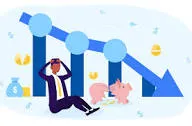
The reason why beginners mostly see their budget evaporate quickly is that they choose too general keywords, use default bidding settings, or forget to add negative keywords. Google may show ads to irrelevant audiences, which results in low-quality clicks and no conversions. Without proper targeting, daily budget limits, and keyword control, campaigns overspend fast and fail to deliver meaningful results.
2.2 Weak Landing Pages
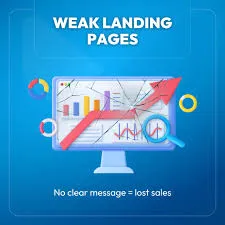
Even if your Google Ads get clicks, a weak landing page can ruin conversions. Beginners often send traffic to pages that load slowly, lack clear calls-to-action, or aren’t mobile-friendly. Poor design, confusing layout, or irrelevant content makes visitors leave instantly, wasting ad spend and lowering your campaign’s overall performance. Optimizing landing pages is key to success.
3 . Why Google Ads Still Works in 2025
Google Ads continues to top the list of platforms that guarantee effective marketing outcomes in 2025 because it targets users with high intent. The AI-driven smart bidding ensures ad delivery at precisely the right moment. None of the other channels guarantee Google Ads-like measurability. With Google Ads, every click, conversion, and ROI is accounted for by an advertiser. Be it a small local shop or a large enterprise, Google Ads fits all business types. Campaigns are scalable from as low as ₹200 up to unlimited budgets, giving businesses total control. With these advantages, Google Ads continues to grow every year, driving traffic, leads, and sales consistently.
4 . Understanding Google Ads Basics
Before running your first campaign with Google Ads, you have to understand some very basic terms to run it effectively. A Campaign is the overall structure; an Ad Group contains related ads and keywords which target similar audiences. CPC determines how much you pay for each click, while CTR measures the ad engagement. Quality Score reflects ad relevance, landing page quality, expected click-through rate, and is another factor in ad ranking. Extensions enhance ads with extra information, such as location or call buttons, to improve visibility. Choosing the right Keywords means choosing those by which your ad would appear in front of the right audience. Learning these fundamentals helps a beginner create wiser campaigns, optimize performance, and achieve better returns on investment from Google Ads.
5 .Step 1 – Set Clear Campaign Goals
The first step in setting up any successful Google Ads campaign is defining clear goals. Google Ads lets you focus on specific goals, such as Leads, Sales, Traffic, Awareness, or App Installs. Choosing the right goal ensures your campaign is optimized for the results that matter most to your business. The Leads or Traffic goals are good for a beginner since they are much easier to track and manage while learning how this system works. Defining the goal of your campaign early helps Google’s AI optimize ad delivery, improve targeting, and maximize ROI. Clear objectives guide ad creation, bidding strategies, and campaign structure, which will make your first campaign more effective.
6 . Step 2 – Conduct Keyword Research
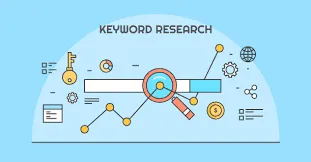
One of the most essential processes for creating a high-performing Google Ads campaign is keyword research. Utilize some of the most trusted tools available, such as Google Keyword Planner, Ubersuggest, SEMrush, or Ahrefs, to find probable keywords for your ads. You should be targeting long-tail keywords that would be more specific, have low competition, and actually attract high-intent buyers prepared for conversion. LSI keywords like “PPC advertising guide” enhance the relevance of content and, not surprisingly, increase the SEO value of this campaign. Proper keyword research ensures that your ads reach the right audience, wasted spend is minimized, and click-through and conversion rates are realized. By choosing the right keywords that better match users’ intent, beginners will be able to create wiser campaigns with noticeable results and greater ROI.
7 . Choose the Right Campaign Type

Pick the right campaign type is crucial to achieving your goals in Google Ads. Google Ads offers different campaign types that include Search, Display, Shopping, Video, and App, each one for a particular objective. Search campaigns can help you reach users who are actively looking for your products or services. Display Campaigns are all about creating brand awareness with visually appealing ads across websites. Shopping campaigns enable any e-commerce business to show their products directly in search results, while video campaigns tap into YouTube as a means to engage audiences with rich media. If you’re a beginner, a good place to get started is with either Search or Traffic-focused campaigns; it’s easier to manage these. By choosing the correct campaign type, you will be targeting the right audience, ensuring maximum clicks, leads, and ROI.
7.1 (a ) Search Campaign
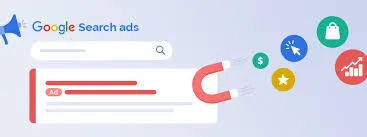
A Search Campaign displays text ads on Google search results when users are searching for specific keywords. It reaches very high-intent audiences that are actually looking for products or services, making it ideal for beginners with lead or sales-oriented goals. Search campaigns are cost-effective, highly measurable, and enable precise keyword and location targeting for maximum conversion and ROI.
7.2 (b) Display Campaign
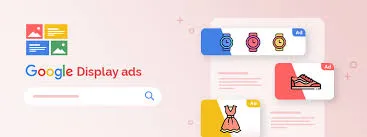
Display Campaigns involve visually appealing banners, images, and videos to reach audiences across millions of websites, apps, and YouTube. They are perfect for building brand awareness and retargeting potential customers who have interacted with your business. Display campaigns will also help the beginner expand the reach, attract new users, and reinforce messaging, complementary to search campaigns for better overall performance.
7.3 (c)Video Campaign

Video Campaigns run ads on YouTube and across Google video partner sites. They are the go-to for storytelling, brand awareness, and engaging audiences with compelling visual content. Video campaigns allow for precise targeting by demographics, interests, and behaviors to help beginners reach the right viewers and increase engagement to drive conversions by building brand recognition with creative and memorable video ads.
7.4 (d) Performance Max
Performance Max is a completely AI-driven Google Ads campaign that runs across all platforms of Google, from Search to Display, YouTube, Gmail, and Discover. It automatically optimizes targeting, bidding, and ad placements for maximum results. Great for both beginners and advanced advertisers looking to drive more conversions, increase reach, and simplify campaign management through smart automation.
8 .Step 4 – Set Budget & Bidding Strategy

A well-set budget and bidding strategy lay the foundation for any Google Ads campaign. First, set either a daily or monthly budget in sync with your business goals and resources. Beginners should use smaller budgets to test campaigns before scaling. Then, select your preferred bidding strategy: Manual CPC allows you to set the bid for every ad auction, whereas Automated Bidding, such as Maximize Conversions or Target CPA, uses Google’s AI to manage performance. Spend and performance tracking is necessary to stay within budget while focusing on maximizing return on investment. With proper budget allocation and smart bidding, campaigns easily run smoothly, reach the right audience, and deliver measurable results.
8.1 Budget
For beginners, start your Google Ads campaign with a daily budget of ₹200–₹500. This range allows you to test ad performance, keywords, and targeting without overspending. As you gather data and spot high-performing ads, you can increase the budget. By starting small, this allows you to learn cost-effectively and helps optimize campaigns for better ROI in due course
8.3 Bidding Options

Google Ads offers the following bidding options: Maximize Clicks, Manual CPC, Target CPA, and Target ROAS. For beginners, it is best to start with Maximize Clicks, which captures traffic and data quickly. Once enough data is captured, switch over to Target CPA for optimizing conversions. Choosing the right bidding strategy ensures efficient spend and better campaign performance.
9 . Step 5 – Create High-Converting Ad Groups

The creation of effective ad groups will lay down the path to a high-performing Google Ads campaign. This means each ad group is thematically focused and includes 5-10 related keywords, 2-3 ads, and one dedicated landing page. For instance, an ad group named “Google Ads Services” could have a focus on keywords like google ads expert, hire ppc expert, and google ads manager. This helps in giving you a better Quality Score, relevance of ads, and lower CPC-all with the intent of saving budget. Well-organized ad groups serve to help Google deliver the right ad to the right person, improve click-through rates, and ultimately drive more conversions. This will lay the foundation for proper planning of a successful and measurable campaign.
10 .Step 6 – Write Compelling Ad Copy

Writing appealing ad copy is necessary to drive clicks and conversions. First of all, use target keywords in the headline to make your ad relevant to user searches. Use a strong CTA like “Book Now” or “Get Started” to urge action. Focus on benefit-driven text, describing what users get, rather than just features. Add in some power words like “Professional”, “Fast Growth”, and “Guaranteed” to make your ad more actionable. A headline example might be “Best Google Ads Services 2025 – Get Faster Leads”, with a description such as “Performance-driven Google Ads management for growing businesses. Book your free strategy call today!” Well-crafted ad copy improves CTR, Quality Score, and campaign performance across the board.
11 .Step 7 – Set Up Targeting & Audience Filters
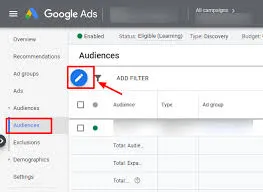
Effective targeting ensures that your Google Ads reach the right audience, improving your conversions while helping reduce wasted spend. You can target users by location, interests, device type, age, and gender to make your ads more relevant. Google Ads offers some advanced targeting options like in-market audiences for users who are actively looking to purchase, custom intent audiences tailored in intent-based targeting, and retargeting lists to reach prior website visitors. Narrow and precise targeting helps deliver ads to high-quality leads while lowering overall costs. By setting up audience filters with care, you make sure of increasing click and conversion rates, enhancing ROI, and reaching users most likely to take action in your campaign.
12. Step 8 – Add Ad Extensions
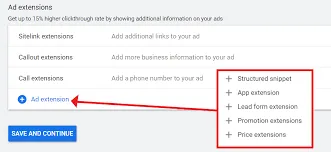
Adding ad extensions is a powerful way to enhance your Google Ads and improve performance. Extensions provide additional information and make your ads more engaging, which can really help to increase your CTR and conversions. The common extensions include Sitelink for linking to certain pages, Callout to give the unique selling points, Call for a direct phone call, Location for business address display, and Structured Snippets in order to showcase products or services. Extensions in Ads appear larger in search results and provide users with additional ways of interacting with them. Google rewards ads with extensions by improving ad rank and visibility. Proper use of extensions helps drive more clicks, enhances user experience, and maximizes ROI for your campaigns.
13 .Step 9 – Optimize Landing Pages
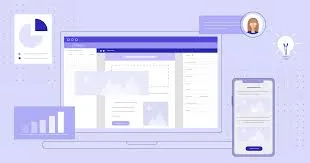
Optimizing your landing pages will help you drive clicks to conversions. A high-converting landing page should have a clear headline that communicates value immediately and a strong CTA to guide people towards action. Ensure fast loading speed, mobile responsiveness, and do not distract them from your main goal. Add social proof such as reviews, testimonials, or trust badges to build trust and encourage confidence. Beginners can use tools like Elementor, Webflow, or Unbounce to create professional responsive landing pages without coding. Well-optimized landing pages improve Quality Score, lower CPC, and increase conversions, making your Google Ads campaigns more effective and cost-efficient while delivering a seamless user experience.
14 .Step 10 – Track Performance
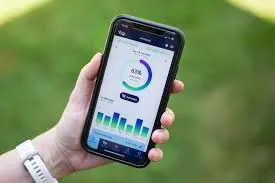
Performance tracking will help you ensure that your Google Ads campaigns are yielding the desired results. Through Google Analytics 4 and Google Tag Manager, track user behavior, set up conversion tracking, and learn which actions actually drive your results. Look into your Search Terms Report to understand what queries trigger your ad and which of those keywords work well. Key metrics to track include CTR, CPC, conversions, Quality Score, and keyword performance. Regular analysis identifies issues to be fixed in your targeting and helps you further optimize ad copy and landing pages. Ongoing campaign reviews and optimization each week will ensure you optimize ROI, stop wasting spend, and maintain efficiency in campaigns; this means your Google Ads strategy can keep pace with evolving trends and changing audience behaviors
15 .Smart Strategies No One Else Is Using

To get ahead with Google Ads in 2025, you will want to use strategies that few of your competitors are even thinking about. One such approach is geo-targeted micro-campaigns, narrowing down targeting to neighborhoods or specific cities to ensure super relevant traffic. Others include remarketing with sequential messaging, where users are shown different ads depending on how they previously engaged, guiding them through the conversion funnel. The adoption of AI-powered bid adjustments for devices, time of day, or audience segments may also bring considerable improvements in ROI. Long-tail, intent-focused keywords combined with tailored landing pages serve to increase Quality Score while lowering CPC. These smart-yet-oft-underutilized approaches help businesses reach a highly targeted audience, cut waste from ad spend, and push conversions to the max to give them an advantage over their competitors in crowded Google Ads.
15.1 First-Party Data Mapping
Upload your own customer data, such as emails, leads, website visitors, or CRM information, to Google Ads. The platform uses this to create high-quality lookalike audiences, reaching new users similar to your best customers. This strategy enhances targeting precision, improves conversions, and is rarely used by competitors, giving you a distinct advantage in campaigns.
15.2 Micro-Intent Keyword Clustering
Target super-specific long-tail keywords, focusing on exact match or phrase match service-focused searches. Examples include “best google ads expert in Delhi for leads” or “digital marketing service for startups hire.” This cuts down on competition, lowers CPC, and brings in highly motivated users, therefore ultimately yielding higher conversions. These precise, intent-driven search terms are commonly left out of competitors’ targeting
16.Conclusion
Running your first Google Ads campaign in 2025 is easy if you work your way through the process in steps. Clearly define campaign goals, select the right keywords, and set precise targeting to reach your ideal audience. Optimize landing pages for conversions and monitor performance with weekly optimization to continuously show improvement. First-party data mapping and micro-intent keyword clustering give you an advanced competitive edge that most advertisers never realize. With these techniques, there is sure to be lower CPC, higher conversions, and maximum ROI. This two-pronged approach in this Google Ads tutorial for beginners combines foundational practices with modern, lesser-used methods to ensure faster results, smarter campaigns, and cost-effective advertising to empower businesses to grow more efficiently in 2025 and beyond. For more insights, check out our blog Common SEO Mistakes That Kill Your Google Rankings in 2025 which can help you improve performance further.”